Noteshelf 3

by | Nov 8, 2023 | iPhone /iPad Apps, Reviews | 0 comments

Introducing the all-new Noteshelf 3 for MacOS – Experience a powerful and distraction-free method of note-taking with smarter note organization and AI-generated handwritten notes.

Noteshelf is one of the most popular note-taking iOS apps, and with its launch on Android, it has become the ultimate hub for all your writing activities. This productivity app helps you take beautiful handwritten notes, make checklists, annotate PDFs, and type documents in one place. Here’s what else you can do with Noteshelf.

Fluid Handwriting

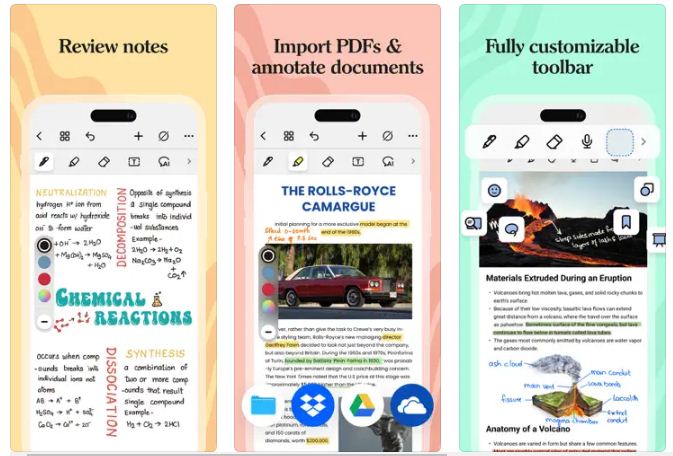
Noteshelf brings you the ultimate handwriting experience. Writing with the app feels as smooth and fluid as writing with a pen on a notepad. You can choose from an array of pens and highlighters in different sizes and play around with colors, shapes, and images to create your own notes. Taking notes or jotting down meeting memos has never been more colorful and fun! Noteshelf also offers a typing feature with lots of styles and formatting options.

Stylus

We support a variety of styli for taking beautiful handwritten notes. You will never miss using a pen and notepad again! On Samsung Galaxy Note devices, we also support a quick-erase option with the S-pen button.

Annotate PDFs, Write On Images

PDF annotations and markups are more accessible than ever! Import PDFs or images into Noteshelf to highlight, underline, or markup with our convenient formatting tools. You can edit school notes, grade papers, fill out forms, and sign documents too!

Search & Convert Handwritten Notes/ OCR

You can search your handwritten notes and even convert handwriting to text. We provide handwriting recognition in 65 different languages.

Record Audio Notes

Record audio as you take notes so you never miss anything important at school or work. Add as many recordings as you want and play them back anytime, even as you take handwritten notes. Loved by students while taking lecture notes!

Vertical Scrolling

You can now change the page scrolling direction from horizontal to vertical for faster navigation between pages.

Evernote Auto-Publish

Auto-publish your notes to Evernote and access them from just about anywhere.

Dark mode

Say goodbye to screen glare and embrace a soothing, eye-friendly dark color scheme.

Noteshelf Club Exclusive

100s of beautifully crafted paper templates and notebook covers to go with your good notes. Get them for free when you sign up for the Noteshelf Club! Find paper templates for classroom notes, meeting memos, to-do lists, shopping lists, personal health trackers, journals, and more!

Plus Points

You can use auto-shapes to quickly draw perfect geometrical shapes. We also provide auto-backup to Google Drive & Dropbox. Share your notes with colleagues, friends, and family over email, Google Drive, Dropbox, and other supported cloud services. Create bookmarks on Noteshelf and organize your notes better!

Final Thoughts

Noteshelf is the ultimate productivity app that helps you take notes, annotate PDFs, and share your notes with colleagues, friends, and family. It supports a variety of styli, audio notes, dark mode, and the Noteshelf Club. It is an excellent choice for anyone looking for a comprehensive note-taking app.


Introducing the all-new Noteshelf 3 for MacOS – Experience a powerful and distraction-free method of note-taking with smarter note organization and AI-generated handwritten notes.
Noteshelf is one of the most popular note-taking iOS apps, and with its launch on Android, it has become the ultimate hub for all your writing activities. This productivity app helps you take beautiful handwritten notes, make checklists, annotate PDFs, and type documents in one place. Here's what else you can do with Noteshelf.
Fluid Handwriting
Noteshelf brings you the ultimate handwriting experience. Writing with the app feels as smooth and fluid as writing with a pen on a notepad. You can choose from an array of pens and highlighters in different sizes and play around with colors, shapes, and images to create your own notes. Taking notes or jotting down meeting memos has never been more colorful and fun! Noteshelf also offers a typing feature with lots of styles and formatting options.
Stylus
We support a variety of styli for taking beautiful handwritten notes. You will never miss using a pen and notepad again! On Samsung Galaxy Note devices, we also support a quick-erase option with the S-pen button.
Annotate PDFs, Write On Images
PDF annotations and markups are more accessible than ever! Import PDFs or images into Noteshelf to highlight, underline, or markup with our convenient formatting tools. You can edit school notes, grade papers, fill out forms, and sign documents too!
Search & Convert Handwritten Notes/ OCR
You can search your handwritten notes and even convert handwriting to text. We provide handwriting recognition in 65 different languages.
Record Audio Notes
Record audio as you take notes so you never miss anything important at school or work. Add as many recordings as you want and play them back anytime, even as you take handwritten notes. Loved by students while taking lecture notes!
Vertical Scrolling
You can now change the page scrolling direction from horizontal to vertical for faster navigation between pages.
Evernote Auto-Publish
Auto-publish your notes to Evernote and access them from just about anywhere.
Dark mode
Say goodbye to screen glare and embrace a soothing, eye-friendly dark color scheme.
Noteshelf Club Exclusive
100s of beautifully crafted paper templates and notebook covers to go with your good notes. Get them for free when you sign up for the Noteshelf Club! Find paper templates for classroom notes, meeting memos, to-do lists, shopping lists, personal health trackers, journals, and more!
Plus Points
You can use auto-shapes to quickly draw perfect geometrical shapes. We also provide auto-backup to Google Drive & Dropbox. Share your notes with colleagues, friends, and family over email, Google Drive, Dropbox, and other supported cloud services. Create bookmarks on Noteshelf and organize your notes better!
Final Thoughts
Noteshelf is the ultimate productivity app that helps you take notes, annotate PDFs, and share your notes with colleagues, friends, and family. It supports a variety of styli, audio notes, dark mode, and the Noteshelf Club. It is an excellent choice for anyone looking for a comprehensive note-taking app.

AI Summary

Discover Noteshelf 3 for MacOS – your ultimate note-taking companion! Experience smooth handwriting, customizable pens, and AI-generated notes. Perfect for jotting down ideas, annotating PDFs, and organizing tasks in one vibrant space. Elevate your productivity with this powerful, distraction-free app!
🤖 AI GeneratedOct 30, 2025305/280 chars

Submit App For Review

Apps4Review team is happy to publish your review. We publish review for iOS Apps, Android Apps and Web Apps (SaaS).
submit Your App for Review
Breaking Free from Expensive School Software: A Deep Dive into GegoK12

Breaking Free from Expensive School Software: A Deep Dive into GegoK12

Educational institutions in India are turning to GegoK12 for a cost-effective solution to managing school operations. With its open-source platform, schools have complete control over their digital infrastructure, ensuring data privacy and security. By eliminating hefty license fees, GegoK12 empowers schools to customize and adapt the system to their specific needs, making it a game-changer in the education technology sector.

Free Stuff Spot App in Canada: The Ultimate Guide to Getting Freebies Worth $300+

Free Stuff Spot App in Canada: The Ultimate Guide to Getting Freebies Worth $300+

The Free Stuff Spot App in Canada offers a streamlined platform dedicated to Canadian consumers seeking genuine, no-strings-attached free products. Verified offers from major Canadian brands ensure users never waste time on expired links or territorial restrictions. Setup is quick and easy, with fresh offers daily. Say goodbye to endless surveys and sketchy promotions – this app delivers exceptional value.

A Game-Changer for Busy Readers: My Experience with ArticleCast

A Game-Changer for Busy Readers: My Experience with ArticleCast

Discover the power of ArticleCast: transform any web article into a natural and engaging audio experience. Effortless to use, simply share the link and enjoy a podcast-style version within moments. Perfect for busy schedules, listen while commuting, walking, or cooking. Say goodbye to endless scrolling and hello to a new way of consuming content.

The AI Sleep Coach Built for Better Nights

The AI Sleep Coach Built for Better Nights

Discover Naptick, the AI-powered “sleep operating system” that transforms your nightly rest into a smart, actionable experience. Say goodbye to overwhelming data and graphs – Naptick’s AI sleep coach delivers personalized recommendations based on your lifestyle and habits. Sync with your wearable device to receive daily insights and take control of your sleep quality like never before.

“Targets” Helped Me Transform My Life, One Goal at a Time!

“Targets” Helped Me Transform My Life, One Goal at a Time!

After using the “Targets” app, I had to share how it changed my life. It’s more than a habit tracker — it’s a personal coach, motivational partner, and success journal in one. If you struggle with consistency or long-term goals, “Targets” is a game-changer. Customizable goals tailored for real life and the powerful Success Timeline feature make it a must-have.

AR Education Apps for Immersive Learning

AR Education Apps for Immersive Learning

Augmented Reality (AR) is revolutionizing education by providing interactive and immersive learning experiences. AR education apps bridge the gap between theoretical knowledge and practical understanding, enhancing learning retention and engagement. From visualizing human anatomy to conducting virtual science experiments, AR technology offers students unparalleled educational experiences. As technology advances, the integration of AR in education is becoming more widespread.

Promote Your App

Elevate Your App’s Presence:
Take advantage of our expert promotional strategies to boost your app’s visibility. Connect with a wider audience and see your download numbers soar. Start your promotional journey today!

Submit For Review

Get Your App Reviewed:
Submit your app for a professional review and gain valuable insights and exposure. Our comprehensive review process helps you refine and enhance your app’s performance in competitive markets.

Helpful Resources

Access Essential Tools & Tips:
Dive into our curated collection of helpful resources. From development tutorials to marketing strategies, find everything you need to succeed in the app world. Explore now and take your app to the next level!