If you are an Android user and have more than one device, you must be very particular about doing backups time to time into your computer and having all the contact details and data with you, no matter which device you are carrying, by syncing them together. And that is the reason why you need a good device manager into your computer to make that happen. Today I am going to mention about one such application that I came across recently, which works great and makes it as easy as pie.
Wondershare MobileGo for Android is an all in one device manager which has introduced the easiest and the smartest way that one can do all the basic operations starting from taking backups, transferring files and syncing multiple devices to a computer. Be it a Mac or a Windows, it works fine and does exactly what it claims to be capable of. It comes packed with loads of tools and features which are proved to be very helpful and useful too.

HOW IT CONNECTS DEVICES!
The way it connects devices to your computer is worth admiring. Once you finish installing the software into your computer, you can use one of the two ways that it offers, to connect your Android devices. First one is through wi-fi and the second one is through USB cable. If you are in the same wi-fi network, you are good to go with the first one. After installing the Wondershare MobileGo application into your Android device, which you can download from Google Play for free, all you got to do is to open the computer application and scan the QR code with your device. You will see a request popping up at the left bottom of your computer screen. Just click on accept and your device will be connected. Or you can simply connect it through USB, in case if you don’t have a wi-fi connection. In this way you can connect multiple devices to it and apply all the basic operations to your Android devices from your computer at the same time.
FEATURES!
After you connect your Android devices to the computer, you will be offered with endless things which you could do with it. The list of features is really huge. It can take backups of all the things that a device could possibly contain to your computer, starting from applications, music, videos, photos, contacts, sms and files. It is not only a backup tool, but also a gateway of new stuffs to your devices. You can download songs, videos, application from the internet and export them to your devices. You can do all the basic things related to managing contacts. You can also send messages to your contacts and read them as well right from your computer.
 THE INTERFACE AND HOW IT WORKS!
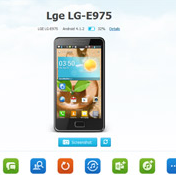
The user interface is very simple and clean which provides an easy understanding to the new users about the whole operation. You will see some preinstalled Online Resources such as Google Play Store, Wontube MP3 and YouTube, from where you can download songs, videos and applications to your computer and transfer it to your connected Android devices. You can also add one or two sites of your own from where you usually download stuffs for your phone from the internet by clicking on the “Plus” sign.
Below that you will see the names of all your connected devices. After clicking on any one of the devices, you will see all the details below it and in the right side of the screen as well. Just choose from the available options to start any of the tasks you want them to perform.
CONCLUSION!
To conclude, it could never be much better. It provides and is equipped with all the features and tools that one could expect from an ideal device manager. It works very fast and saves lots of your time and effort as well. You will really enjoy using the app and organizing things will be a fun thing to do. So, it is recommended that you buy this software and start experiencing the smartest and fastest way of file transferring between devices.
Worth Using Backup system : Try MobileGo on android