Artificial intelligence is moving beyond answering questions and generating content. The next generation of AI tools aims to complete everyday tasks, manage connected applications, and automate repetitive work with less manual effort. Meta Muse is one of the latest examples of this shift. Launched in September 2026, the personal AI agent can assist with scheduling, emails, online research, document creation, and other productivity activities.Dedicated iPad support introduced in October and additional integrations for business applications are helping Muse expand rapidly. But does it offer enough practical value to change how people work?This Meta Muse Review 2026 examines its features, supported platforms, pricing, limitations, and potential role in the future of AI productivity.
What Is Meta Muse?
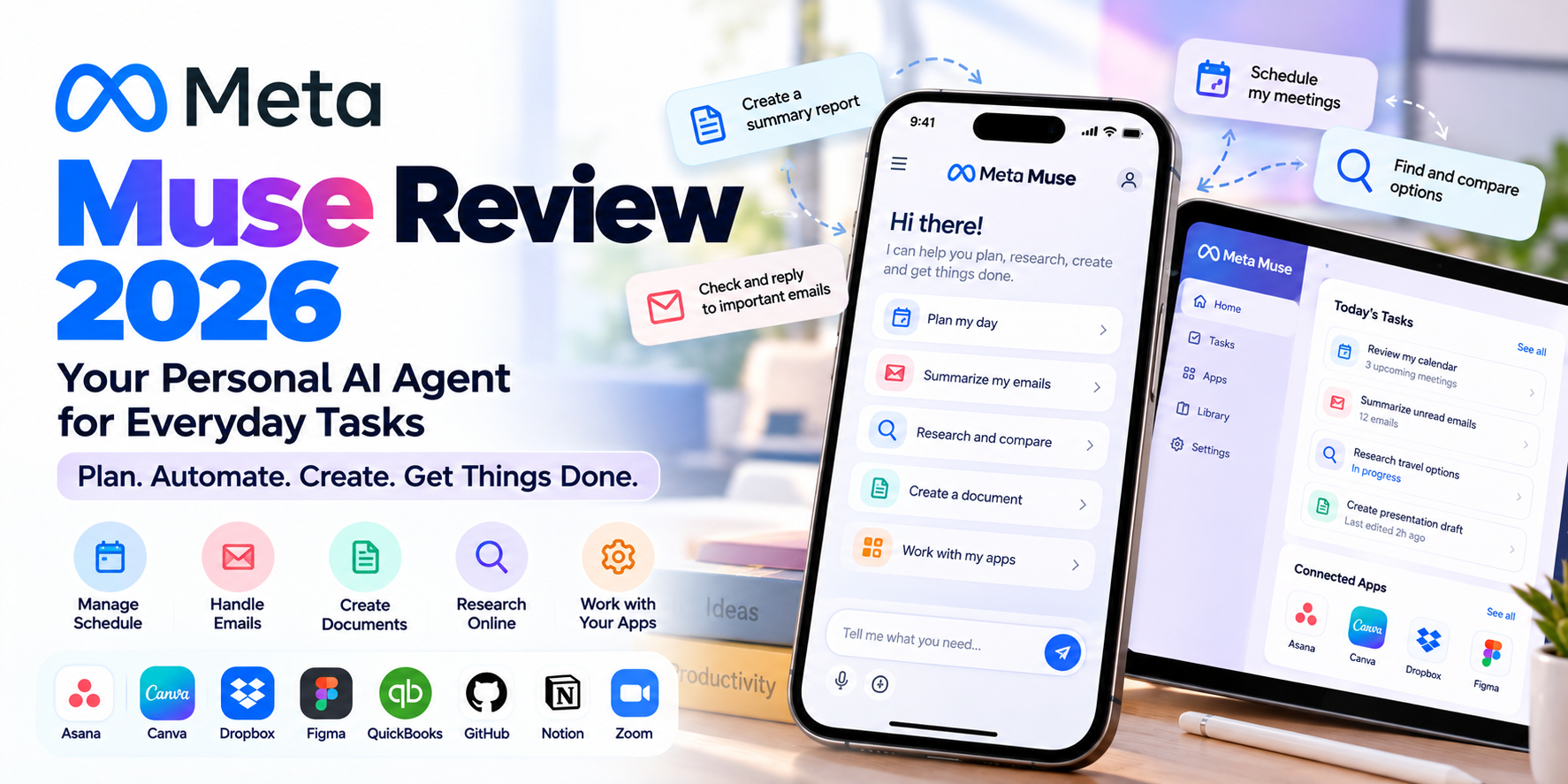
Meta Muse is a personal AI agent developed by Meta. Unlike traditional chatbots that primarily respond to questions, Muse is designed to take actions across websites and connected applications on behalf of users.According to Meta, the assistant operates through a dedicated virtual computing environment with browser capabilities. This allows it to navigate websites, complete forms, research information, and carry out supported tasks.Users can interact with Muse conversationally, assign tasks, connect supported services, and review actions requiring their approval.
Source: Meta AI – Introducing Muse
Key Features of Meta Muse in 2026
1. AI-Powered Task Automation
Muse is designed to handle multi-step tasks rather than simply provide instructions. Depending on the task and connected services, it can research information, organise activities, prepare documents, and interact with websites.For example, users could ask Muse to research a service, compare available options, and prepare a summary. The assistant can work through supported steps while users retain responsibility for checking important results.
2. Email and Calendar Management
Meta describes email and calendar management as important Muse capabilities. With appropriate permissions, the assistant can help identify important messages, draft replies, organise schedules, and flag meeting conflicts.These features may be useful for professionals who spend significant time switching between inboxes, calendars, and task-management applications.
3. Integration With Popular Business Applications
The October 2026 update expands Muse’s connections with business and productivity services, including Asana, Canva, Dropbox, Figma, QuickBooks, GitHub, Klaviyo, and Zoom.Additional connectors for services such as Notion and Granola broaden its potential usefulness for individuals and teams.For small businesses, these integrations could reduce the need to move manually between applications when preparing marketing materials, coordinating projects, or organising information.
Source: 9to5Mac – Meta Muse iPad Launch and New Connectors
4. Background Tasks and Reminders
Muse can continue certain assigned activities in the background, including reminders, monitoring tasks, and follow-up actions.This approach makes the assistant different from applications that require users to open them and initiate every interaction manually.
5. Support Across Multiple Devices
Muse launched on iPhone and Android in September 2026, followed by a Mac application. On 7 October, Meta expanded support to the iPad.The iPad version provides another way to access the assistant on a larger display, while Meta has also indicated that Windows support is planned.Availability may vary by region and platform, so users should check the official download page before planning to adopt the service.
Source: TechCrunch – Meta Muse Launches on iPad
Meta Muse Pricing and Availability
Meta offers free access to the Muse application, although its App Store listing also indicates in-app purchases. Users should verify the latest subscription options, usage limits, and regional availability before signing up.The official Muse download page provides access to supported mobile and desktop applications.
Official Website: Download Meta Muse
Meta Muse: Advantages and Limitations
Potential Advantages
- Automates supported repetitive tasks and workflows.
- Connects with popular productivity and business applications.
- Supports conversational task instructions.
- Offers reminders and certain background activities.
- Provides access across several supported devices.
Potential Limitations
- Some capabilities require access to personal accounts and sensitive information.
- Automated actions may produce mistakes or unexpected outcomes.
- Third-party websites can restrict automated interactions.
- Availability and supported features vary by platform and region.
- Human review remains important for financial, business, and privacy-sensitive actions.
Is Meta Muse Safe to Use?
Privacy and reliability are major considerations when evaluating personal AI agents. Unlike a basic chatbot, an agent may need access to email, calendars, files, and other connected services to complete tasks.Meta describes Muse as having security controls and approval mechanisms. However, these protections do not eliminate the possibility of incorrect actions or unintended information sharing.Recent reporting has highlighted concerns from early AI-agent users about account access, privacy, and unexpected automation behaviour.A sensible approach is to begin with low-risk tasks, grant only necessary permissions, and review actions involving purchases, sensitive information, or external communications.
Source: Business Insider – Privacy Concerns Around Personal AI Agents
Who Should Consider Meta Muse?
Muse may appeal to freelancers, entrepreneurs, students, and professionals who regularly manage several applications or repeat similar administrative tasks.Small business owners may find its expanding integrations particularly interesting for organising information, preparing content, and coordinating routine activities.However, users who primarily need occasional AI-generated answers or writing assistance may not benefit enough from its broader automation capabilities to justify connecting additional accounts.
Final Verdict: Is Meta Muse the Future of AI Productivity?
Meta Muse represents an important direction for productivity software: AI systems that can perform tasks rather than simply recommend how to complete them.Its combination of connected applications, background activities, and conversational instructions makes it an interesting option for people exploring practical AI automation.Nevertheless, Muse is not a complete replacement for established productivity applications. Its usefulness depends on supported integrations, reliability, user permissions, and the level of oversight required.The conclusion of this Meta Muse Review 2026 is that Muse offers a promising glimpse of AI-assisted productivity, but users should approach autonomous workflows carefully and retain control over important decisions.
Sources
- Official product information – Meta AI – Accessed: 08 October 2026
- Muse productivity features – Meta AI Productivity – Accessed: 08 October 2026
- iPad launch and platform expansion – TechCrunch – Published: 07 October 2026
- New application integrations – 9to5Mac – Published: 07 October 2026
- AI-agent privacy concerns – Business Insider – Published: October 2026