Google Workspace helped popularize genuinely seamless real-time document collaboration long before it became a standard expectation across productivity software, letting multiple people edit the same document simultaneously without the version conflicts that plagued earlier desktop-based tools. Microsoft has since closed much of that original collaboration gap with 365, and it’s worth checking in 2026 whether Google Workspace’s continued feature investment and typically lower cost still make it the clearer choice for small teams, or whether the two platforms have genuinely reached rough parity. This review looks specifically at where Workspace still holds a real edge and where the gap has genuinely closed enough that the decision comes down to personal or team preference.
Real-Time Collaboration
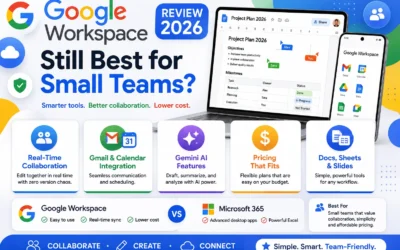
Google Workspace’s real-time collaboration in Docs, Sheets, and Slides remains genuinely smooth and reliable, with visible cursors and instant syncing that still feels marginally more polished than Microsoft 365’s equivalent features.
🔗 Download on Play Store | workspace.google.com
Gmail and Calendar Integration
Gmail and Google Calendar’s tight integration remains genuinely seamless for scheduling and communication, a workflow many small teams already default to even outside a formal Workspace subscription.
Gemini AI Features
Google’s Gemini AI features integrated throughout Workspace now handle drafting, summarization, and data analysis within Docs and Sheets directly, genuinely competitive with Microsoft’s Copilot features in similar contexts.
Pricing and Where It Falls Short
Google Workspace’s pricing typically remains somewhat lower than comparable Microsoft 365 tiers, though teams needing genuinely deep desktop application power, like complex Excel macros, may still find Microsoft’s desktop applications more capable in specific advanced scenarios.
Teams that specifically prioritize seamless real-time collaboration and typically lower cost still get genuine ongoing value from Google Workspace, since that core advantage remains real even as Microsoft has closed much of the gap. Teams with genuinely deep existing investment in complex Excel spreadsheets or specific Microsoft desktop application features may find Microsoft 365 a better fit despite the higher typical cost. It’s worth trialing both platforms directly against your team’s actual current workflow and existing file formats before committing, since switching costs and file compatibility often matter more in practice than any single feature comparison. Small teams without strong existing loyalty to either ecosystem should weigh the typically lower Workspace pricing meaningfully, since that cost difference compounds noticeably across a growing team over time. It’s also worth checking how well each platform handles files shared by outside clients or partners who may be using the opposite ecosystem, since file format compatibility issues still occasionally surface in mixed-ecosystem collaboration. This matters more than it might initially seem for firms regularly exchanging documents with outside clients, vendors, or legal counsel who may default to the opposite ecosystem entirely.
Google Workspace’s original collaboration advantage has narrowed as Microsoft 365 has closed the gap, but its typically lower pricing and continued smooth real-time editing still make it a genuinely strong default for small teams without deep existing Microsoft dependencies. For teams prioritizing cost and collaboration simplicity, Google Workspace in 2026 remains a genuinely solid choice, though teams with real Excel-heavy workflows should weigh Microsoft 365 carefully first. Testing both platforms with an actual current project, rather than a demo template, remains the most reliable way to settle which ecosystem’s specific quirks a team will genuinely tolerate best day after day, since a spec sheet comparison rarely captures how a tool actually feels once real deadlines and real files are involved.