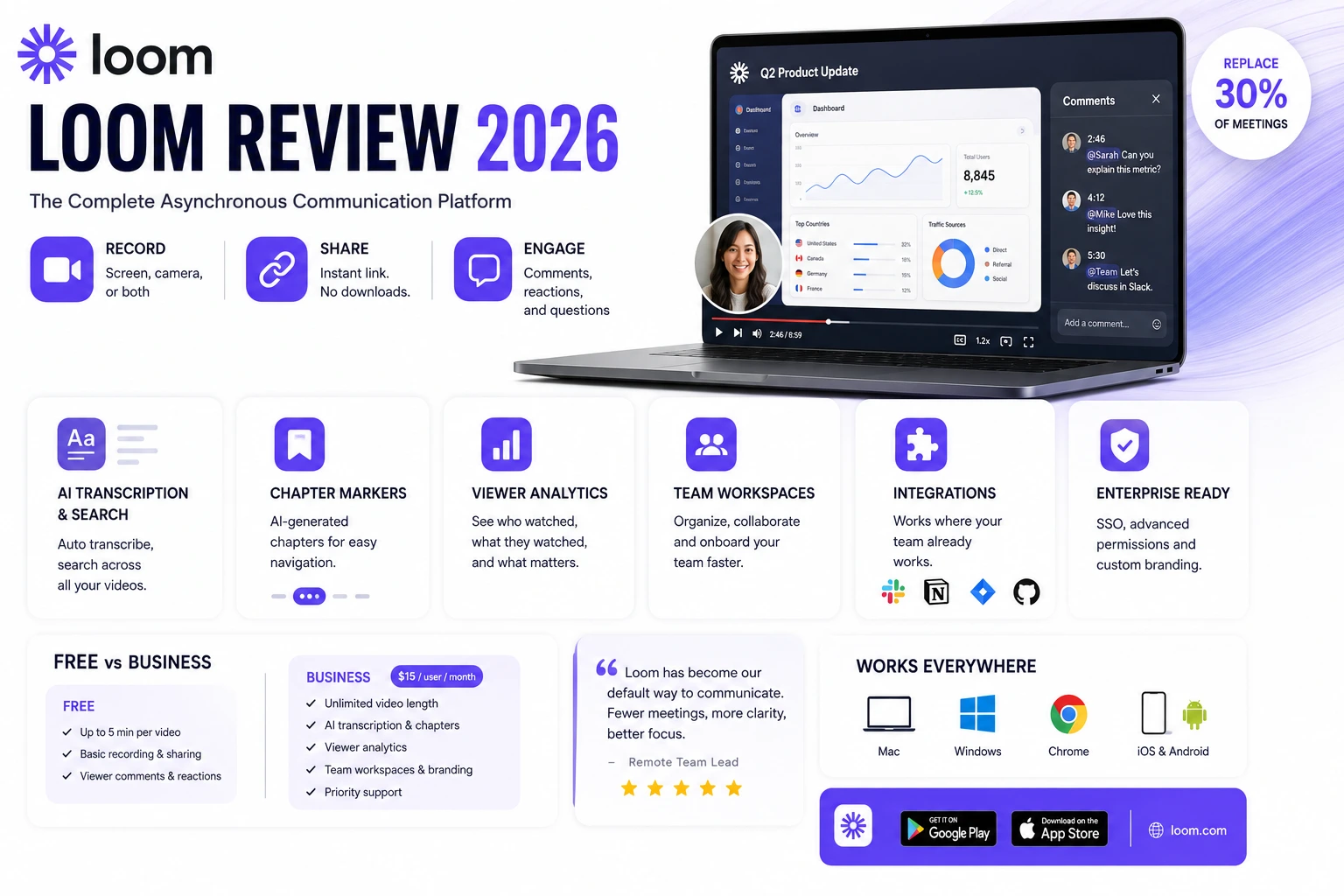
Loom started as a simple screen recording tool. Record your screen, send a link, done. In 2026, the platform has evolved into a complete asynchronous communication layer that remote teams use to replace a significant percentage of synchronous meetings, explain complex topics with visual context, and maintain the richness of video communication without the scheduling overhead of real-time meetings. This review tests every aspect of the 2026 product across real team use over thirty days.
What Loom Does in 2026
Loom records your screen, camera, or both simultaneously and generates a shareable link within seconds of stopping the recording. The viewer opens the link in any browser – no app download required – and can watch immediately, leave timestamped comments, emoji reactions, and follow-up questions directly on the video timeline.
This base functionality is unchanged and still works perfectly. What has changed significantly in 2026 is everything around the recording – the AI processing, the viewer analytics, the workspace organisation, and the integration ecosystem that turns Loom from a one-off tool into a team communication infrastructure.
AI Transcription and Search in 2026
Every Loom video in 2026 is automatically transcribed within minutes of recording completion. The transcript is searchable across your entire Loom workspace – you can find any video where you mentioned a specific topic, project name, or decision. For remote teams who create significant numbers of Looms over months and years, this searchability transforms the archive from a collection of difficult-to-find recordings into a genuinely navigable knowledge base.
The AI also generates automatic chapter markers from the transcript, dividing longer recordings into labelled sections that viewers can jump between. A twenty-minute walkthrough of a complex technical system becomes navigable in the same way a well-structured document is, which dramatically improves the usefulness of longer recordings for viewers who need specific information rather than the full context.
Viewer Analytics – Understanding Engagement
Loom Business provides detailed viewer analytics showing who watched each video, how far they watched, where they rewatched sections, and where they stopped. For remote team leads, this data reveals whether important process updates and announcements are being consumed or ignored. For sales teams sharing product walkthrough videos with prospects, it shows exactly which sections generated the most interest.
In testing across a customer success team workflow, the viewer analytics revealed that a specific section of a standard product walkthrough video had the lowest completion rate across all viewer segments – indicating a section that was either unclear or irrelevant. Removing and replacing that section improved overall video completion rates measurably within two weeks.
Team Workspace Features
Loom workspaces in 2026 allow organising videos by team, project, or topic with folder structures and permissions that match organisational hierarchies. New team members can be onboarded through a structured playlist of Loom videos without requiring live onboarding sessions from senior colleagues. The onboarding library is always current because updating it means re-recording a specific Loom rather than scheduling and running an entire onboarding session.
Workspace-level templates allow standardising the structure of recurring video types – weekly team updates, design reviews, sprint retrospectives – so that all contributors follow the same format without explicit instruction. This consistency makes the videos more useful for viewers who know what to expect in each section.
Integration Ecosystem
Loom integrates directly with Slack, Notion, Linear, Jira, GitHub, and most major productivity platforms. Pasting a Loom link into Slack unfurls with a playable preview. Inserting a Loom into a Notion page embeds it fully. For teams who use these tools as their primary work surfaces, Loom videos become a native part of the existing workflow rather than a separate place to visit.
Download Loom on the Play Store or App Store. The Loom desktop app for Mac and Windows is available at www.loom.com.
Loom Free vs Loom Business
The free Loom plan allows recordings up to five minutes in length, which is sufficient for most use cases – the most effective Loom videos are typically two to four minutes. Loom Business at fifteen dollars per user per month removes the time limit, adds the AI transcription, chapter markers, viewer analytics, workspace organisation, and custom branding. For teams creating Looms regularly as a communication channel, the Business features justify the cost through the time saved in meeting reduction and the improvement in video usability from the AI features.
When Loom Works Best and When It Does Not
Loom works exceptionally well for explanations that benefit from visual context – walking through a design, demonstrating a software bug, explaining a data dashboard, giving feedback on written work with the document visible. It works less well for genuinely collaborative decision-making that requires real-time input from multiple people simultaneously.
The best remote team workflows use Loom for asynchronous updates, explanations, and reviews while reserving synchronous meetings for genuinely collaborative working sessions where real-time iteration is necessary. Teams that replace all meetings with Loom lose the collaborative benefits of real-time discussion. Teams that replace none of their meetings miss the significant time savings available from making asynchronous communication the default.
Final Verdict
Loom 2026 is the most complete asynchronous video communication platform available. The AI transcription, search, and chapter marker features genuinely transform the usability of the recordings beyond the original screen recording concept. For remote and hybrid teams, it is one of the highest-ROI communication tools available at any price point