Evaluating a church management app is harder than it looks. Most platforms have polished marketing pages listing dozens of features — but the features that matter to a church administrator on a Tuesday morning are rarely the same ones given the most space on the sales page. The ones that get used every week are simpler and more operational than the ones that get the headlines. What makes this evaluation problem worse is the specific dynamic of the church software market: purchasing decisions are typically made by volunteers or part-time administrators who do not evaluate software professionally, demos are presented by salespeople on curated data, and the cost of switching — migrating years of member records from one platform to another — is high enough to feel irreversible. This guide cuts through the feature lists and looks at what church management platforms actually need to deliver, how to tell whether a platform genuinely delivers on each one, and the questions worth asking before any commitment is made.
The right way to evaluate a church management app is not to compare feature lists. Start with the workflows that happen every single week — then work backwards from there.
The Evaluation Problem Most Churches Run Into
The pattern repeats often enough to be worth naming directly. A church evaluates two or three platforms, watches the demos, consults the feature comparison page, and makes a decision. Three months into using the chosen platform, the gaps start appearing. A feature that appeared on the checklist exists — but behind a separate add-on fee that was not obvious during the sales conversation. A module that sounded essential turns out to be used twice a year. An interface that looked clean on a curated demo with fresh data is confusing in practice for the volunteer secretary updating member records every week with her own congregation’s messy reality.
The switching cost compounds the problem. Moving years of giving history, member profiles, family links, attendance records, and group memberships from one platform to another is a significant undertaking. Once a church has committed, reversing the decision is expensive enough that most administrators make it work even when the platform is not serving them well. This dynamic creates an incentive for vendors to optimise for the sales experience rather than the daily-use experience.
The defence against this is evaluating platforms on the workflows that actually happen every week — and specifically on the features where daily-use quality matters more than feature-list presence.
What a Church Management App Must Do Without Compromise
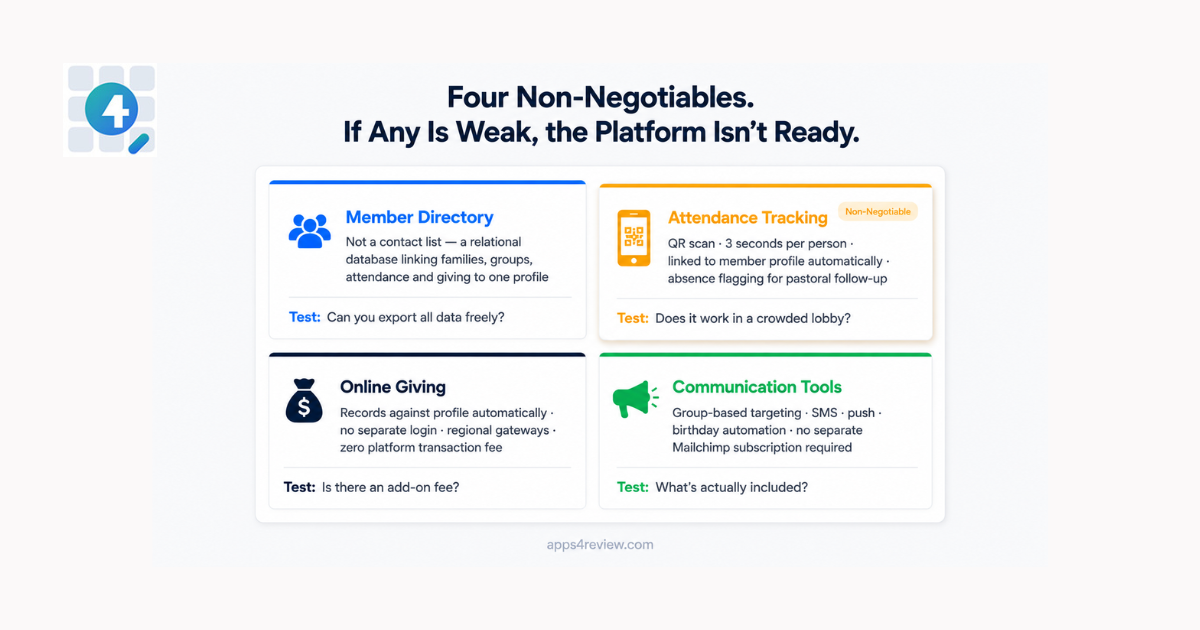
These are the capabilities that every church management app must handle well. If any of these is missing, genuinely difficult to use, or locked behind an additional paid tier, the platform is not fit for purpose — regardless of what else it offers.
Member Directory: The Foundation Everything Else Connects To
A member directory is not a contact list. It is a relational database that links people to their families, their ministry groups, their attendance history, and their giving records. The quality of the directory determines the quality of everything else in the platform — because every other module draws data from it.
What to look for: searchable and filterable profiles with multiple field combinations, family unit linking that shows a household as a connected group rather than unrelated individual records, photo storage, custom fields for church-specific data points that no generic platform anticipates, and clean CSV export for when data needs to move to another system. A well-built directory also handles guest tracking separately — visitors who attend but have not formally joined, who can be converted to members when appropriate without manual re-entry.
What to watch for: platforms where family relationships are flat with no household grouping, where search is limited to name only, or where exporting your own data requires contacting support. Any platform that makes data export difficult has a structural incentive to keep you locked in — that is a meaningful signal about how the vendor relationship will develop over time.
Attendance Tracking: Speed and Accuracy at the Door
Manual attendance registers are a weekly administrative burden that most church administrators are actively working to eliminate. The cost is real: 30 to 60 minutes of data entry every Sunday, producing records that are always slightly inaccurate and always delayed by the time leadership reviews them.
Modern platforms replace paper registers with one of two approaches: digital check-in via a tablet or kiosk at the door, or QR code scanning where each member carries a printed photo ID card with a unique code that staff scan using any smartphone. The QR approach is faster in practice — a scan takes three seconds, staff see a real-time count, and the data is automatically linked to each member’s profile. No queue, no manual transfer, no transcription errors.
What to look for: attendance records tied directly to member profiles rather than stored in a separate module, the ability to run reports by date range and by individual member, automatic flagging of members absent for consecutive weeks to support pastoral follow-up, and a check-in process that remains reliable in the physical reality of a crowded lobby on Sunday morning.
What to watch for: attendance modules that still require manual entry after the service, or check-in systems that are slow enough to create a queue at the door. The attendance tool that saves time is the one that works in three seconds per person — not the one that requires a two-step process.
Online Giving: More Than Accepting Payments
Digital giving is now a standard expectation for congregation members across most markets. A church management platform that handles giving through a disconnected third-party integration — with a separate login, a separate donor database, and a manual reconciliation process — is creating administrative work rather than reducing it.
The giving module needs to do more than process transactions. It should record every donation against the giving member’s profile automatically, support multiple giving funds with designated tracking so that building fund donations are never mixed with general tithes, allow recurring giving with member-managed schedules, and generate year-end tax statements without manual compilation.
What to look for: payment gateway options that go beyond Stripe and PayPal — particularly important for churches in Africa, South Asia, and Latin America where local payment methods dominate. Platforms that support M-Pesa, Flutterwave, or Paystack are meaningfully more functional for international congregations. Also look for platforms that charge no additional platform fee on top of the payment provider’s standard rate — some platforms add a percentage on every transaction that accumulates to a significant sum across a year of congregational giving.
Communication Tools: Reach Without Extra Subscriptions
A church communicates constantly — event reminders, service announcements, pastoral messages, birthday greetings, emergency notifications, prayer updates. A church management platform that requires separate subscriptions to Mailchimp, Twilio, and a push notification service to handle all of this has not solved the communication problem. It has distributed it across more tools.
What to look for: group-based targeting that allows sending to specific ministries, committees, or demographic segments without maintaining separate contact lists for each. SMS support for markets where email open rates are low. Push notification delivery through a companion mobile app. Automated scheduling for birthday and anniversary messages that run without weekly manual effort.
What to watch for: platforms where communication is a basic email-blast tool with no segmentation capability, or where SMS requires a third-party integration with its own monthly fee and separate login. The communication tools that actually get used are the ones accessible directly from the same dashboard as the member directory.
The Features That Matter — But Are Not Reasons to Choose or Reject a Platform
The following capabilities should be present in any complete platform but are secondary to the non-negotiables above. Their presence matters; their absence in any single area is not disqualifying on its own.
Event Management. A church calendar with event creation, RSVP tracking, and automatic reminders is standard in any serious platform. The quality variable is integration: the best implementations link event attendance directly to member profiles so that participation history accumulates over time. The weakest treat events as a completely separate module with no connection to the member database. If a member attends 40 events in a year and none of that appears in their profile, the event management module is producing data that no one uses.
Church Website Builder. Many platforms include a simple website CMS for publishing sermons, events, and announcements. This is a genuine convenience for churches without an existing web presence. It is rarely good enough to replace a professionally built site if one exists. Evaluate it as a useful secondary capability rather than a primary decision factor.
Ministry Groups. Bible studies, worship teams, committees, and volunteer rosters need their own communication channel and attendance tracking within the broader platform. The critical quality marker is whether group membership links back to the main member directory or operates in a silo. A member in three groups whose contact details change should require one update, not three. Platforms where group records are disconnected from the main directory create ongoing maintenance overhead that grows with the size and complexity of the congregation.
The Mobile App Question
The question of whether a church management platform includes a member-facing mobile app has moved from a nice-to-have to an expected feature in most markets. The distinction worth understanding is between an administrative mobile app — for staff managing the platform on the go — and a congregation-facing mobile app that members use to engage with their church. Both are useful. The congregation-facing app is the one that actually affects member engagement patterns.
For churches in sub-Saharan Africa, Southeast Asia, South Asia, and Latin America, the mobile app is not secondary — it is the primary interface. These are mobile-first markets where most members access the internet exclusively through a phone. A platform without a genuine mobile offering will consistently underperform in exactly the regions where church growth is most active.
What separates strong mobile implementations from weak ones: whether push notifications are delivered through the church’s own branded app — with the church’s name and identity on the notification — or through a generic platform notification that most members will not recognise or respond to. A notification that says “Your Church Name” is opened at a meaningfully higher rate than one that says the name of a software vendor.
Pricing Models: What the Monthly Fee Is Actually Buying
Church management platforms use several different pricing structures, and understanding their long-term implications matters more than the headline monthly figure.
Per-member pricing charges based on congregation size. It feels fair when a church is small, but costs increase as the congregation grows — often at precisely the moment when budget pressure is highest and cash flow is most constrained.
Flat monthly subscription charges a fixed fee regardless of member count, typically tiered by features. More predictable, but pricing is usually calibrated for larger, better-resourced churches. Smaller congregations pay the same rate as larger ones for features they may not use.
Modular subscription charges separately for each functional area — member management, giving, check-in, events, communications — with each module priced independently. The headline entry price looks low; the realistic operating cost for a church that needs all modules is significantly higher.
Open source and self-hosted means the software itself carries no licence fee. The church pays only for hosting infrastructure, typically $3 to $10 per month. The trade-off is the technical overhead of managing a server — addressed either through in-house capability or a managed hosting service from the platform developer.
For a practical reference on what a complete, self-hosted feature set looks like, ChurchCMS’s feature documentation is useful — it is MIT-licensed open source software, which means every feature can be evaluated at length without a trial deadline, a sales conversation, or a credit card.
The most important pricing question is not the monthly figure. It is the three-year total cost of ownership — including add-ons that turn out to be necessary, price increases that occur mid-contract, and the switching cost if the platform does not work out. Build that full figure into every comparison before making a decision.
How to Evaluate Any Church Management App Before You Commit
The following questions produce more useful information than any feature comparison table. Run every platform through all of them before making a decision.
Can a non-technical administrator use it without training?
The person entering member records and updating attendance every week is often a volunteer with no technology background. If the interface requires explanation to navigate, that friction will show up as errors, incomplete records, and resistance to using the system at all. The best platforms are self-explanatory for the workflows that run every week.
Does data connect across all modules?
Member records, attendance, giving history, group memberships, and communication logs should all share the same underlying data. If any module operates as a silo — with its own separate database that does not automatically reflect changes made elsewhere — the church is maintaining multiple systems rather than one.
What does it cost over three years, all-in?
Monthly fees compound. A platform at $72 per month costs $2,592 over three years. A platform at $49 per month with three necessary add-ons at $15 each costs $3,636. Open source self-hosting at $8 per month in infrastructure costs costs $288. Build the real three-year number before comparing platforms on price.
Can you export your data completely and freely at any time?
Any platform that restricts, charges for, or makes difficult the export of member data, giving history, and attendance records has a structural incentive to prevent you from leaving. This is a red flag regardless of how good the platform is in other respects. Your congregation’s data belongs to your church. Any platform that treats it otherwise is a liability.
Is there a member-facing mobile app?
Not for administrators — for the congregation. If there is not, member engagement will migrate to WhatsApp, Facebook groups, and email chains that no church administrator has visibility into or control over. The platform’s mobile offering determines whether digital engagement happens on church-controlled infrastructure or on third-party platforms.
Frequently Asked Questions
Q: What is the most important feature to evaluate in a church management app?
The member directory. Every other feature — attendance, giving, communication, events — draws data from the member database. If the directory is poorly structured, limited in search capability, or disconnected from the platform’s other modules, every downstream function will underperform. Evaluate the directory first and in depth before assessing anything else.
Q: Is per-member pricing or flat monthly pricing better for a growing church?
Flat monthly pricing is more predictable, but neither model is inherently better. The more relevant question is total cost at your expected congregation size in three years — not today’s size. Per-member pricing that looks affordable at 100 members may be expensive at 400. Flat pricing that seems high for a small church may be good value at medium size. Model both scenarios before deciding.
Q: How important is the mobile app in a church management app evaluation?
Increasingly important — and essential for congregations in mobile-first markets. The specific question is not whether a mobile app exists but what it does for congregation members and whether push notifications are delivered under the church’s own branding. A generic notification from a software vendor gets lower engagement than one that appears to come from the member’s own church.
Q: What pricing model offers the best long-term value for a small church?
For small churches with modest technical capacity, open source self-hosted platforms offer the lowest total cost of ownership over three to five years. The software licence is free; the only ongoing cost is hosting infrastructure. Platforms like ChurchCMS provide a complete feature set under this model — the full feature documentation is publicly available for evaluation without any trial deadline.
Q: What is the most common mistake churches make when choosing a church management app?
Evaluating features rather than workflows. A platform with 40 features that handles the five weekly workflows poorly is worse than a platform with 15 features that handles the five weekly workflows exceptionally well. Start with the tasks that happen every single week — member record updates, attendance recording, giving entry, event reminders, group communication — and evaluate only on those before assessing anything else.
Q: How do you evaluate data portability before committing to a platform?
Ask directly: can we export a complete CSV of all member records, giving history, and attendance data at any time, without contacting support and without a fee? Test it during the trial period if possible — attempt an export and verify that the output is complete and usable. A platform that provides vague answers to this question in the sales conversation, or where the export function is difficult to find during a trial, is telling you something important about the vendor relationship.
What the Review Comes Down To
The best church management app is not the one with the longest feature list or the most polished marketing page. It is the one whose daily-use experience matches the actual workflows of the people using it every week. The administrator updating 20 member records, the treasurer reconciling a week of giving, the pastor checking who has missed the last three Sundays and needs a follow-up call.
Evaluate on workflows, not features. Build the real three-year cost before any comparison. Confirm data portability before any commitment. And ensure the mobile offering is genuinely suited to your congregation’s geography and device habits — not just present as a checkbox on a sales page.
A platform that answers all of these questions well is worth paying for. One that does not — regardless of how complete its feature list appears — will consistently create more administrative work than it eliminates.